 Main
Main

 Latest
About
Photos
WebCam
Words
Graphics
RISC OS
AMPlay
 Features
What's New
Known Bugs
Requirements
License
Download
Docs
Screenshots
Beta
SpriteUtils
Recurse
BitField
Diary
Fan
Icons
Music
Links
Credits
Site Map
RISC OS

AMPlay 2.03
AMPlay is a desktop player for MP3 music files, using the AMPlayer module.
Features
What's New
Known Bugs and limitations
Requirements
License
Download
Documentation
Screenshots
Beta
It contains a number of features specifically aimed at dealing with very large collections of MP3s ('large' in this context is many thousands or even tens of thousands).
Main Features:
|
| Understanding that an MP3 collection is not just a flat list of files, but can be treated as a heirarchy - each track comes from an album (a collection of tracks in the general sense), which in turn is by an artist. AMPlay will work this out automatically. |
|
| Highly scalable. Tested with the default settings up to 100,000 tracks in the database, with no problems. By increasing the dynamic area limit, databases up to around 1,200,000 tracks should be possible. The database grows as needed, and is intelligent about recalculating only what is needed. |
|
| Support for filtering out sections of the database by artist, album, or specific track. These filters can be saved and reloaded as required. Up to 20 filters can be stored within AMPlay, and multiple filters can be active concurrently. Filtering is sensitive to the playback order (see below) in that you can tell AMPlay only to play certain tracks if they are being played in order, as part of the entire album they belong to. You can also indicate that certain tracks should only be played in isolation (i.e. only in random track mode) |
|
| Completely flexible playback order. AMPlay can choose artists, albums or tracks at random or in database order. Albums within artists, and tracks within albums or artists can be shuffled. There is also a chaos mode where the playback order itself is randomised. |
|
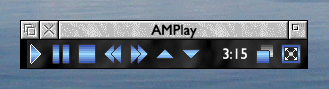
| Mini version of main window. Either the mini or main windows can be set to "always on top". |
|
| History of tracks, albums and artists played. |
|
| Support for jumping directly to a particular artist, album or specific track. |
|
| Track, album or artist repeat. |
|
| Link to Next capability to allow you to tell it to treat a sequence of tracks, albums or artists as a single unit, and not to split them up when playing in random order or while shuffling. |
|
| Ignore Uniqueness. This is a flag that can be set per-track, album or artist, and indicates that AMPlay should not bother checking whether it has been played recently. ('Recently' is also configurable) |
|
| Relative Track Volume can be set on any track to compensate for particularly loud or quiet tracks. |
|
| Random weighting adjustment. A weighting can be applied to tracks, albums or artists, to influence the random item picker for or against the item in question. |
|
| Support for sequence files to play files from the database in a specified order while keeping the database grouped into albums and artists. |
|
| Search interface allowing you to apply a range of actions to tracks, albums or artists matching particular criteria. |
|
| Save state - remeber window positions etc. |
|
| Ability to scan a directory structure for MP3 to add to the database. |
|
| Customisable main window buttons to launch other MP3 related applications (e.g. equaliser, visualisation etc). |
|
| Customisable icon bar icon actions. |
|
| Block menus for dealing with menus that could potentially contain many thousands of items (it displays them in blocks of configurable length) |
|
| Programmer's API to allow AMPlay to be controlled by other programs, or remotely. |
|
| Utilities to control AMPlay from the command line, or from another machine. |
What's New:
2.03 is a minor update, mostly related to improvements and fixes in support for skins.;
|
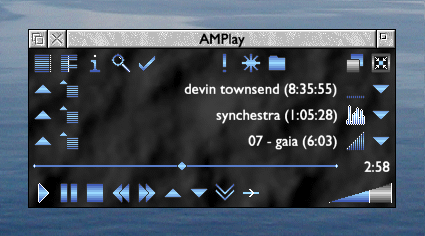
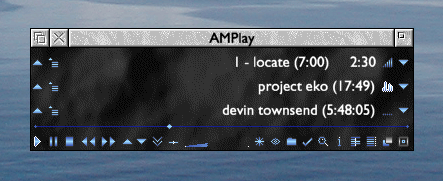
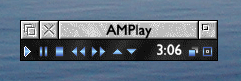
Redesigned main window and sprite set, to provide larger icons, and reduced risk of mis-clicking etc. This redesigned skin is now the default - the previous skin is still supplied with AMPlay as 'Small Blue'. See the screenshots below. | ||||||||||
|
Various fixes/improvements to skin handling;
| ||||||||||
|
Fixed bug with the goto menu for albums by the current artist. In some cases, only the first album was being displayed. | ||||||||||
|
Very large total durations are now displayed correctly on the database statistics window. The limit is now 231 seconds (roughly 68 years), rather than 231 centiseconds (roughly 250 days). |
There are also changes to AMPlayCfg;
|
Skin settings now have a pane in the options all to themselves. |
|
Skin previews and descriptions are now available (the skin has to provide these) |
|
When run manually, or from AMPlay, AMPlayCfg now remembers its window position, and which pane was selected. (This honours the 'state saves window positions' option.) |
|
When run from Configure, AMPlayCfg opens under the mouse pointer, (as recommended by the Style Guide). |
For more information, refer to the main AMPlay documentation.
Known Bugs/Limitations:
The following are bugs discovered since release, and are not documented elsewhere;
None at present.
The following are covered in the documentation;
AMPlay 2.x can upgrade from any earlier 2.x version. However, as far as upgrading from 1.x versions is concerned, it will only upgrade from the saved state and database of AMPlay 1.5x. AMPlay 1.5x also needs to have had the 'binary state format' option enabled (which it was by default).
Changing panes in the database editor or AMPlayCfg causes it to jump to the front.
There is some obscure combination of circumstances, generally involving playing external tracks (i.e. AMPlay is displaying info about a track that isn't in its database) which results in the fast forward and rewind buttons being greyed out when they shouldn't be. I've seen this several times, but been utterly unable to reproduce it when monitoring the exact sequence of steps. If you see this, pausing and unpausing will clear it. If you can work out what you did to cause it, please let me know . . .
There have been some instances where operations that start a different track playing (Next, Forcenext, Previous Album, etc) fail to unpause. i.e. You're on one track, paused. Clicking next takes you to another track, but it starts paused on the new track. Most instances of this are fixed, but one known one remains - clicking next during the locate within track that occurs during startup (if the option to remember position within track is set).
Operations (pause, play etc) that take place while AMPlay is in the process of changing from one track to the next may be ignored.
Requirements:
AMPlay requires;
|
| RISC OS version 3.7 or later. It is 26/32bit neutral. |
|
| Enough processing power for the AMPlayer module to decode MP3s in realtime at sufficient quality. In practice, this makes a StrongARM RiscPC the minimum spec for most people, although the faster ARM7500FE based machines might just about suffice with some tweaking of the AMPlayer options. |
AMPlay also requires the following modules;
|
| AMPlayer 1.39 or later. By Thomas Olsson, Justin Fletcher and Robin Watts. For 32-bit systems, download the unofficial 1.39 build, unless a later official build exists. |
|
| ABCLibrary 4.15 or later. You may well already have this, if not, refer to the linked page. A copy of this is included with AMPlay, but may not be the latest version. |
|
| CallASWI 0.03 or later. You may well already have this, if not, refer to the !System updates section in the linked page. |
|
| AcornURI 0.12 or later. AMPlay will work without this - it just uses it for the email and web buttons on the program information window. |
License:
AMPlay is freeware.
The AMPlay source has its own license information covering what uses can be made of it.
License details are included in the downloads, but are also available here;
AMPlay License.
AMPlay Source License.
AMPlay is built using the DrWimp library. For more details on this, refer to; http://www.rayfavre.me.uk/drwimp.html
Download:
Complete Packages
|
| AMPlay 2.03. Complete Application and Text Documentation, including AMPlayCfg 2.03 (836 KB zip file). Includes both of the skins used in the screenshots below. |
|
| AMPlay 2.03 Source. Includes source for AMPlayCfg, and all the utilities. (763 KB zip file) |
|
| AMPlay 2.03 skins. Extra skins for AMPlay - different colour scheme variants of the supplied skins. (317 KB zip file) |
|
| AMPlay Utilities. AMPlayRCG (Remote Control Gateway), Simple client for AMPlayRCG, AMPlayAPI test app (87 KB zip file) (NB: This hasn't changed for a while, and is still v2.00a) |
|
| Static link to the latest version. http://www.mikejs.com/riscos/amplay/amplay_latest.zip will always contain the latest version of AMPlay. Link to this if you want a non-version dependant link. Currently, it's just a copy of the AMPlay 2.03 archive, listed above. |
Updates
None at present. Use the complete 2.03 archives linked to above to upgrade from any earlier version.
Documentation:
The following documents are included with AMPlay, but are also available here;
|
| 1 Introduction. |
|
| 2 Main Features. |
|
| 3 Interface. |
|
| 4 Configuration. |
|
| 5 File Formats. |
|
| 6 FAQ. |
|
| 7 Messaging API. |
|
| 8 Miscellaneous. |
|
| 9 Change Log. |
Screenshots:
The default skin - main window:
The default skin - mini window:
The "Small Blue" skin (the former default skin) - main window:
The "Small Blue" skin (the former default skin) - mini window:
Beta:
This section is for downloading AMPlay beta versions or patches.
No beta versions are currently available.
 RISC OS. RISC OS.
|
 Top. Top.
|
